
By Daniel Loftus
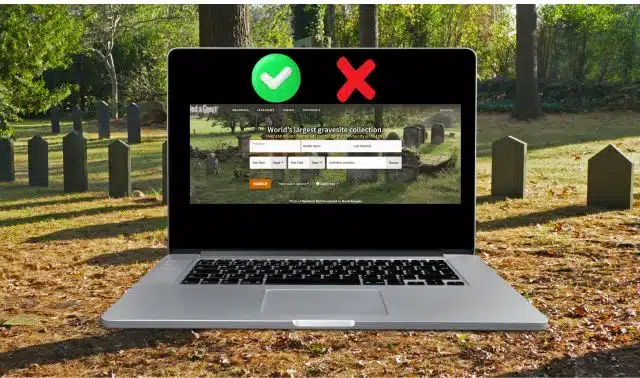
From its beginnings in 1995, thanks to Jim Tipton, Find a Grave has proved incredibly informative to genealogists thank to the millions of ‘memorials’ available on its site. That said, there are some good practices to observe – such as what to do and what not to do.
Having used the website for my own family history research, I have adopted some good practices (and have also learned what is best to avoid). With that in mind, here are four of my do’s and four of my don’ts to get the most out of using Find a Grave.
The Do’s:
1. When taking photo of headstones, use your GPS
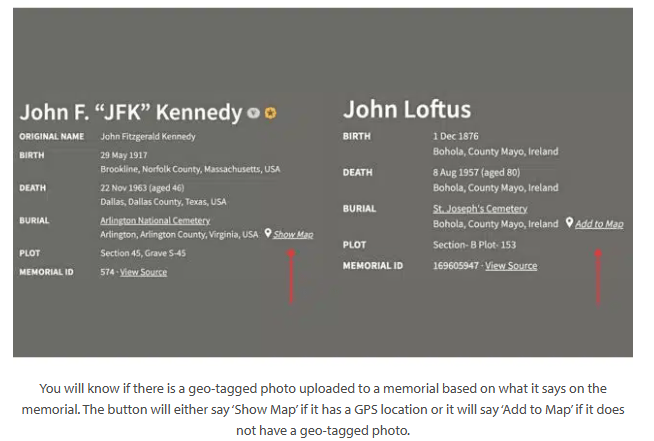
In large cemeteries, unless there is no map or an easy way to get access to information about the location of a grave, having a GPS location added to the photo can make a grave much easier to locate. To do this, make sure you have the location turned on your phone. When you have your location turned on when you take a photo, it includes the GPS location of where the photo was taken in the photo’s metadata. This will be part of the photo’s data when you upload it to Find a Grave. This is called a geo-tagged photo.
By having a geo-tagged photo and uploading it, when you visit a memorial’s page on Find a Grave, you will be able to click a ‘Show Map’ button to be taken to where the exact grave is via Google Maps.
2. Use virtual cemeteries
Virtual Cemeteries is a Find a Grave feature that can be incredibly helpful if you are trying to contain your relatives’ graves in an easily compiled list. For instance, I have a virtual cemetery for memorials on my dad’s side and a virtual cemetery for memorials on my mum’s side. You may want to go a step more organized than I have and perhaps create a virtual cemetery for those from a certain branch of your family, those with a certain surname or from a certain locale (this might be helpful for you, if you are doing a One Name or a One Place Study!). However, needless to say – you aren’t limited in this. Do what works for you!
Perhaps one of the main ways in which I use this feature is to make a list of graves that I would like to go and visit someday. Therefore, if they are all recorded in a virtual cemetery, I can take a look at my profile and easily find who I want to look at in one place.
3. If you are photographing headstones, plan ahead
When visiting a cemetery, take a look at its page on Find a Grave – every cemetery has a landing page where you can take a look at the statistics on it. For instance: the number of memorials or the percentage of (user created) memorials that are already photographed.
There is also a part of the cemetery’s page which shows how many open photo requests exist for a cemetery. For instance, Kilkinure Cemetery in Kiltimagh, County Mayo, Ireland (where a lot of my family is buried) as of writing has 11 open photo requests. This means that photos have been requested by users 11 memorials associated with Kilkinure, which you can go and fulfill in-person.
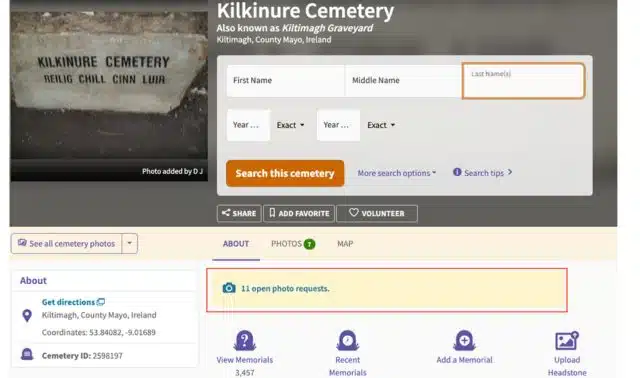
By clicking on that banner, I can see a list of memorials that need photos added. I can ‘claim’ a request that I know that I will be able to do. By clicking on the memorial name, you should be provided with a location of where to find the grave allowing you to locate it and subsequently photograph it. Keep an eye on the list as while you’re visiting a cemetery or looking for the graves of your own ancestors in-person, you might be able to help somebody else see their ancestors’ resting place.
4. Link memorials
When viewing a memorial on Find a Grave, one of the things that people look for is any connection made to other memorials on the site. This can be such a beneficial way when trying to establish ties between members of a family, particularly if the members of a family died quite some distance from one another.
One example of this is a granduncle of mine had died in London, away from other members of the family. I didn’t know where exactly until I found the Find a Grave memorial for his parents, which had linked their memorials with his.
You can connect memorials on Find a Grave in two ways. If you do not manage it, you can suggest an edit. If you manage the memorial page, you can change it directly by editing the memorial. To make a connection, you need the memorial ID of the memorial you want to connect with it.
The Don’ts
1. Don’t rush to make a memorial; be mindful
This is my first major “don’t”. If you are aware of my past writings on the topic of Find a Grave, you will know that I hold the view of “Wait, Don’t Make” – this was an initiative to make users stop and think before creating a memorial to the website for someone who had recently died and do not have a headstone yet, or in some cases, has not even been buried yet. Whenever we create a memorial, there is a person and a family behind each one. It is important to give families the chance to grieve in peace.
In the past, contributors have too often focused on being first to put up memorials. Every time a tragedy or notable event occurred, the same thing would happen: there would be a rush to Find a Grave to create memorials, evidently to be able to claim credit for being the first to document an individual’s death, even though they wouldn’t have been buried or laid to rest yet. As a result, they would get details wrong.
In many circles that I am in (for both non-genealogy friends and genealogy friends), no one’s first thought should be “I have to create my relative’s memorial on Find a Grave” when a relative of theirs has died. Sadly, this happens. Since July 2021, I have only created one memorial as an exception – making a memorial for a dear friend’s close relative.
When we document any grave or final resting place, behind every marker, headstone and monument, there was a person and their story, so we need to be responsible and ethical about how quickly (and in what manner) we document this. It does not make any sense to create a memorial for someone who has just passed away.
So, when someone has just died, please give the family time to grieve before you create a memorial for the deceased. Give it a month, or more. Everybody grieves differently. Please do note, that this “practice” is not done by all users of Find a Grave, it is a minority of Find a Grave users. As the saying goes, Rome was not built in a day. So please, when you see a newly published obituary and you wish to create a memorial – wait. Don’t make it yet, the family should always come first.
2. Don’t cut off any means of contact for members to get in touch with you
This is something that I have seen more and more members do, and I feel this somewhat inhibits users from interacting with the site. Find a Grave gives users the option to allow messaging through its site (which can be found in the ‘Notifications’ section of the Account page), but some users for one reason or another, will instead choose to allow people to contact them only via email or not at all.
For the email option, the email address associated with your account will be publicly viewable on your profile. If you have an email address that you would rather go there instead. For example, if you set your account up using a personal email and want people to contact you with a dedicated email address, you need to change the email associated with your Find a Grave account, which can be done in your settings.
Whether you want to allow contact via an email address or through the site’s messaging system, is up to you – but I would strongly recommend that you have some means of people contacting you, if you are a contributor to Find a Grave. It can allow members to ask you to transfer a memorial to them, or even to say thank you for putting a photo of a headstone online (I know I have done this for the kind contributors who have uploaded photos of headstones for collateral ancestors of mine in New York that are not easy for me to visit, being in Ireland!).
3. Don’t take everything at face value
As people who are interested in genealogy, we ensure we are as accurate in our research as possible, drawing on and making use of many different sources. When we see a memorial on Find a Grave, we want to believe all the information on there is accurate. I urge you to check for a source to back up to verify what’s there.
I also feel it is important to highlight that last year, a group of genealogy friends and I had discovered there had been 250 fake memorials created by one user, for individuals who didn’t exist. From false names, to use of stock images as the deceased people to even uploading real people’s LinkedIn profile pictures – with the user stating it was for the deceased person! I wrote more about it on my blog. So, please double check what you see, no matter how well sourced it seems.
4. Don’t use the wrong acronym
Whenever you talk about Find a Grave, do one of two things. Either, write it out in full as ‘Find a Grave’ or abbreviate it to FG. Do not put an a / A in the middle of that for two reasons. One of which is writing it out in full, it becomes a common homophobic slur. The other reason is that in social media platforms, that can be flagged and comments or posts containing it might not be posted as a result.
A version of this article was published online in September 2025. Last updated: May 2026
